Driver Documents on the system is incredibly popular, this is only available to clients using the FleetCheck Professional and FORS FMS software solutions.
Driver Documents allows you to send Documents to your Drivers mobile phone.
To start utilising this area, you need to ensure that you have the Driver section enabled within the Mobile App area on the main system
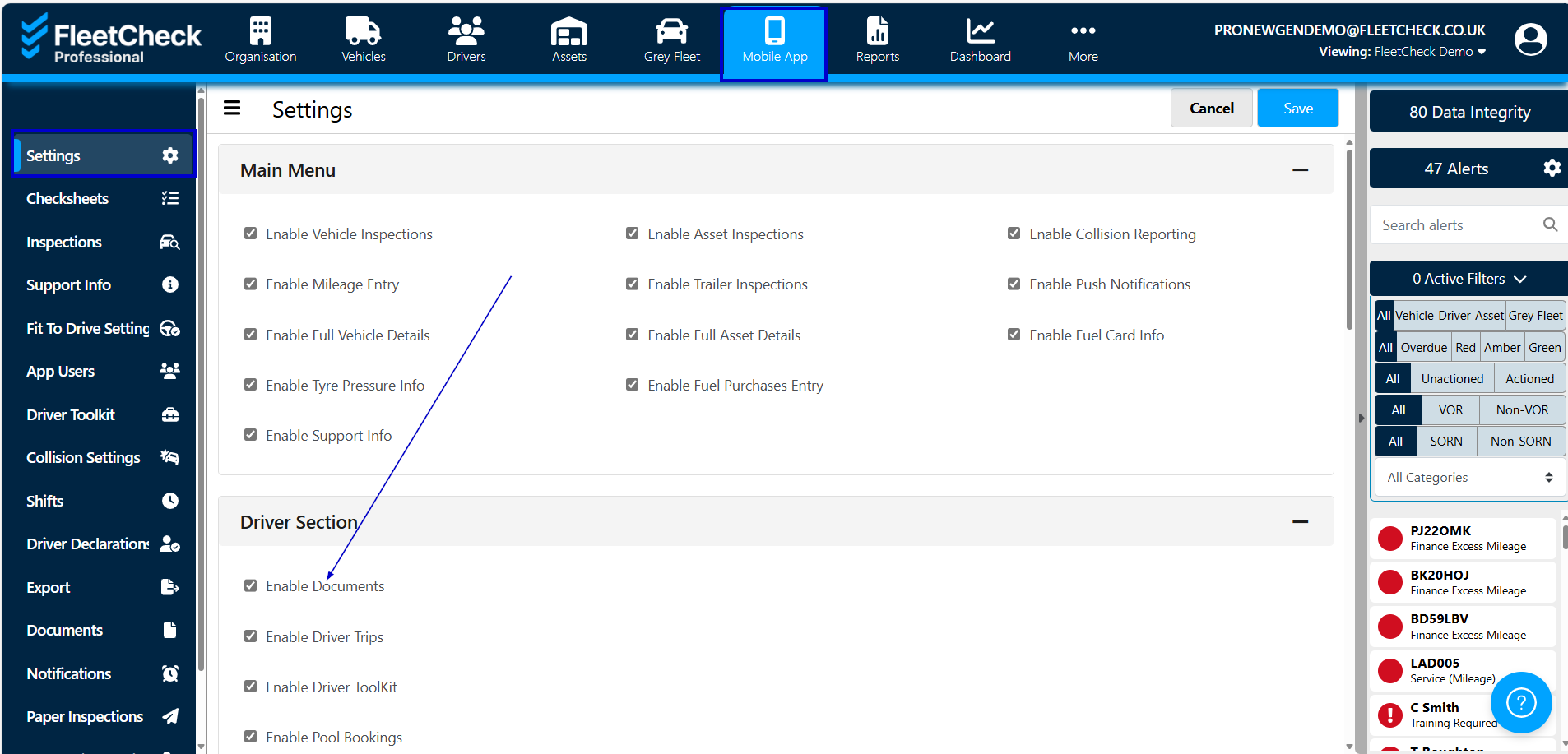
On the Driver Documents section on the system you are able to send documents such as policies etc that your organisation needs your drivers to read. This is located within the Documents area on the left hand side menu

Once in this section you will see that you have the ability to send your Documents to Document Groups -

By setting up document groups you are able to specify which pool of Drivers the document can be sent to.
Once the group has been created

Its literally then a case of assigning a new Member to the group -

This can be via individual Drivers, Departments and Categories.
Once selected - save and then go back into Documents to send your desired document to your Group -

What makes this highly useful is if you have a mixed fleet type - you might need to send out different documents to drivers within a certain category/vehicle type. Tool Box talks is a perfect example of what you might want to send out - as the document/information you wish to send could only be relevant to the drivers within that group and not the whole fleet of drivers.
Driver Groups allows you to send to specific individual/driver types, you can also see within this page the recipients the document went too, whether they have read it and whether it is has been understood. You can also select whether the document is mandatory to view.