Now, as you can imagine, processing Northern Irish driver licences on the FleetCheck LicensedAssured platform is somewhat different to the U.K Licence approach.
If you have a Northern Irish Licence check, you will need to go into the drivers individual record on FleetCheck LicenceAssured. Once opened, you will see a green button on the right-hand side of the screen that says + Add New Mandate
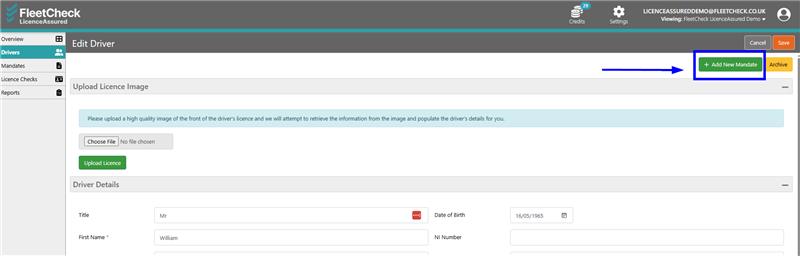
Once you click that button, you will need to use the drop-down menu to change the ‘Type’ to Paper (NI). The view will change to the below
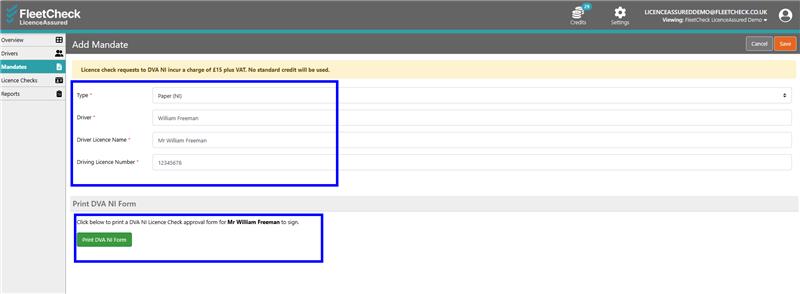
Please complete the mandatory fields and then select the green ‘Print DVA NI Form’ button. This will take you to a new page where you will be able to select your printer and print the form for your driver to complete.
Once the form has been printed, you will see a new area at the bottom of that page where you will be able to select the form (once completed by your driver and scanned back to your desk/laptop) and the hit the green ‘Upload DVA NI’ button.
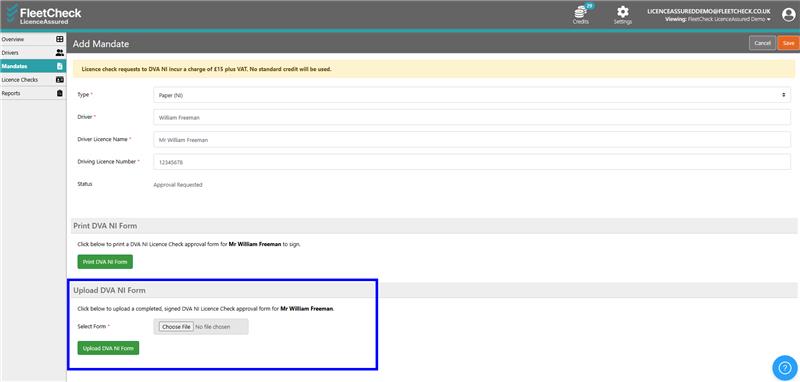
Once this is uploaded, our Customer Services team will receive a notification, and they start the process for the licence check and update accordingly.